Skip to Main Content

Welcome!

Looking for the right charging solution?Discover Blink

Welcome to Blink Charging support

Thank you for choosing Blink. Below you will find the most commonly asked questions about our services.

Support

Questions or comments?

Contact us today. Then we will let you know as soon as possible! Blink Charging: Posthoflei 3/bus 4 2600 Berchem Belgium VAT BE0833.034.020

Charge Card

My charge card does not work at another Operator’s charge point

We are working hard every day on expanding our charging network as much as possible. But, we are dependent on several parties, so things can occasionally go wrong. Can’t charge at another operator’s charge point? Always contact the operator! Usually, the help desk can see the reason for the error message and solve the problem or give appropriate instructions. If you experience persistent problems with your Blink charge card, please contact our Customer Service. We are happy to help you!

* Blink Charging Co is not liable for the correctness and accuracy of data provided by third parties regarding the location, availability, and operation of their charge points.

It’s quite annoying when a non-EV car is parked right in the spot you could use to charge your car. If a non-electric car is parked in a spot designated as a parking space for electric cars, it is a traffic violation. In this case, the police can issue a fine for wrongful parking and ask the driver to move the car. So, you can always contact the local police in this case.

Can you find the request in your EVA portal listed under Requests?

  • If yes, check the delivery address. If this is wrong then unfortunately, your charge card was sent to the wrong address. Request a charge card again at the correct address. Is the address correct? Then wait for seven workdays after the request date. If you still have not received the charge card, the shipment was probably lost in the post. Request the charge card again, possibly at a different delivery address.

  • If no, the charge card request is not yet complete. Chase the requester! Need help? Please refer to the manual! Or check the delivery address. If this is wrong then unfortunately, your charge card was sent to the wrong address. Request a charge card again at the correct address.
    Is the address correct? Then wait for seven workdays after the request date. If you still have not received the charge card, the shipment was probably lost in the post. Request the charge card again, possibly at a different delivery address.

It’s really easy! Consult the manual for a full description.

Blink Network

What is the fee structure of a charging session?

A Charging Session usually has a fixed Session Fee plus a kWh Rate fee that scales with the total charge. Blink will initially keep a fixed portion (20c including VAT) of the Session Fee to cover part of our transaction processing costs. Later in the year, we will introduce a small percentage fee onto the kWh Rate. The kWh Blink fee will initially be waived as a gesture of goodwill to drivers and our hosts while our Network upgrade is completed.

What is self-billing?
A Self-Billing Agreement is a mutual agreement between a supplier and a customer in which the supplier creates invoices on behalf of the customer for the goods or services the supplier provides. This differs from the current method, whereby the customer issues their own invoice. In this document, Blink will be referred to as the ‘Supplier’ or the ‘Transaction Processor’.

Why a Self-Billing arrangement?
Blink Charging utilises self-billing for all collections and reimbursement services to ensure administrative simplification, greater accuracy, and timely payments.

What does Self-Billing mean for you?
You will receive an invoice that Blink generates on your behalf each month. This invoice is the basis for reimbursing you for the billable charging sessions from the previous month. You may process this invoice in your accounting system as a self-bill or a customer invoice, but you should not issue an invoice to Bink for payment. As soon as you receive the self-bill, the 30-day payment term begins. Once Blink has paid, you can mark the invoice as paid.

Can customers opt out of the self-billing agreement?
Blink Charging’s collections and reimbursement service operates exclusively through self-billing. This ensures administrative simplification, greater accuracy, and timely payments for the customer.

What happens if a customer issues an invoice despite the self-billing agreement?
As Blink generates invoices, customer-issued ones won’t be processed. If this happens, we’ll gently remind the customer about our process.

How are disputes over self-billed invoices resolved?
We’re always here to help! If you have an issue, just contact us at:
• Belgium: support.be@blinkcharging.com
• France: support.nm@blinkcharging.com
• Germany: support.nm@blinkcharging.com
• Ireland: support.ie@blinkcharging.com
• The Netherlands: support.nl@blinkcharging.com
• UK: support.uk@blinkcharging.com

What are the benefits of self-billing for the customer?
There are several important requirements for a self-billing agreement.
• Customers do not issue their own invoices during the term of the agreement.
• Acceptance that the Supplier will provide an invoice on behalf of them.
• Providing accurate tax and company details to ensure proper billing.

What are the requirements for a customer to enter into a self-billing agreement?
The customer does not need to create invoices to receive their reimbursement, passing the administrative burden onto the payment processor.


Who is responsible for invoice creation?
Under the self-billing agreement, the supplier (Blink) is responsible for creating and issuing invoices to the customer based on the goods or services received.

How does Blink ensure invoice accuracy?
We use a detailed process with automated checks to ensure invoices are spot-on. We encourage customers to check the invoices regularly and let us know if anything is incorrect. Customers can find the details of each invoice in the Blink Host Portal in the ‘Reports’ section under the ‘Host Revenue’ tab.If you need support accessing your invoices in the Blink Host Portal, please contact your Account Manager or email support at:

• Belgium: support.be@blinkcharging.com
• France: support.nm@blinkcharging.com
• Germany: support.nm@blinkcharging.com
• Ireland: support.ie@blinkcharging.com
• The Netherlands: support.nl@blinkcharging.com
• UK: support.uk@blinkcharging.com

What happens if the supplier’s tax details change?
It’s important to ensure your tax and company details are kept up to date. To notify Blink of any changes to your tax or company details, please email the addresses mentioned above.

Is there an audit trail for self-billing invoices?
Yes, invoices are stored and shared with customers. Blink keeps internal records for verification purposes.

Are self-billed invoices compliant with international VAT laws?
Yes, self-billed invoices are compliant in the regions in which we operate. Changes to tax legislation are not within our control but we keep informed of changes to legislation which may impact our selfbilling agreements.

Why does the customer need to sign a separate agreement?
The collection and reimbursement of charging sessions is carried out by Blink Network BV, a sister company of the local Blink entity. Blink Network BV is incorporated in the Netherlands.

Under EU VAT legislation, electricity is classified as a tangible good. The VAT framework governing the supply of electricity was established in 2005, before the emergence of EV charging infrastructure. However, it is generally assumed these regulations apply to EV charging and that parties engaging in the payment flow (collections and reimbursements) are effectively participating in the buying and selling of electricity.

Since the existing contract is between the customer and the local Blink entity (the supplier), an additional agreement is necessary to formalize the relationship between all three parties: the customer, the local Blink entity (the Supplier), and Blink Network BV (the transaction processor).
You can find the standard agreement at the bottom of this document.

If you would like more information about this, our finance department is ready to answer any questions you may have.

How will I be able to sign this agreement?
You will receive an email invitation to sign the Collections and Reimbursement Agreement via DocuSign. You can easily sign it online, and Blink will take care of the rest. Once we receive the signed agreement, we will commence planning of your transition to the Blink Network and will notify you of this closer to the time.

What happens if there is an error in the self-billed invoice?
If a self-billed invoice contains an error, the supplier or customer will notify the supplier or customer immediately. The supplier will issue a corrected invoice and adjust any payment discrepancies.

Can customers request early payments?
Payment terms should remain consistent with the agreed contract. The self-billing process does not inherently change the payment terms but should expedite the process by reducing invoice-related delays.

How does self-billing impact accounting for customers?
If your accounting system supports self-billing, you can simply book the invoice. If not, just create an invoice entry using our Blink reference.

How are VAT and other taxes handled in a self-billing agreement?
The supplier will calculate and apply VAT (or any applicable taxes) based on the information provided by the customer regarding goods or services rendered. The VAT invoice will be generated in compliance with the local tax regulations. The customer should ensure the VAT numbers and tax details are accurate on their records.

How are self-billing invoices delivered to customers?
We keep it simple by sending invoices directly to your email.

How often will invoices be generated under self-billing?
Invoices are generated at monthly intervals by email.

How can I change the email address where Blink sends the self-billing invoice?
We use your email address registered in our system. If you need the self-billing invoices to be sent to a different address, please contact your Account Manager or email support at:
• Belgium: support.be@blinkcharging.com
• France: support.nm@blinkcharging.com
• Germany: support.nm@blinkcharging.com
• Ireland: support.ie@blinkcharging.com
• The Netherlands: support.nl@blinkcharging.com
• UK: support.uk@blinkcharging.com

Can customers integrate self-billed invoices into their accounting software?
Not yet. We don’t currently offer API or system integration for self-billing.

How does Blink ensure customers acknowledge their invoices?
If we don’t hear back from you, we’ll assume everything is correct and accept the invoice per our agreement.

What happens if Blink makes an overpayment?
If this happens, our finance team will request a refund or adjust it against your next invoice.

Invoices, payments, and reimbursements

I charge through my HOA, what rate do I pay for charging at home?

Blink Charging provides the energy for the charging stations within your Home owners association (HOA). You pay for this through your charge card. For each charging session you do, a variable rate per kWh (kilowatt hour) is charged. This tariff consists of the average electricity price in Belgium, as published by CREG, plus a fixed service fee of 0.055€ incl. VAT for HOA Light and 0.175€ for the HOA Full Model.

There are no monthly or annual fixed costs for managing your charge point. All services are included in the tariff. Very convenient!

Attention! We always apply the rate published for the month, two months before the charging period. In other words, for April charging sessions, the average rate of February is applied. These charging sessions are billed in May. We do this because CREG regularly publishes with delays and we would like to provide consistency.

If you use a charge card of another provider, it is possible that they charge extra. 

Below is a table with the rates we have applied this year.

Charging Period HOA Light  HOA Full 
February ’250,39390,5139
March ’250,41580,5358
April ’250,42510,5451
May ’250,42550,5455
June ’250,42120,5412
July ’250,40170,5217
August ’250,39560,5156
September ’250,40060,5206
October ’250,41130,5313
November ’250,40420,5242
December ’250,40160,5216
January ’260,41070,5307
February ’260,41660,5365
March ’260,43330,5366
April ’260,40920,5533

All prices include VAT. 

The publications of the CREG can be found here. The table ‘residential DC 8000kWh – digital counter with EV’  is used as a reference for charging prices.

What is the capacity tariff?

The capacity tariff is a new tariff methodology that the Flemish energy regulator (VREG) will use to calculate the distribution network costs. This is not an additional cost to the electricity bill; it will replace the current calculation of the grid costs. 

When does the capacity tariff start?

The capacity tariff is applied since January 1st of 2023. 

Why is the capacity tariff important? 

The aim of this new tariff methodology is to provide a financial incentive to consumers and producers to use the grid efficiently by limiting irregularities and providing a stable consumption/production profile. The capacity tariff drives consumers to distribute their energy consumption so that it spreads out throughout the day, limiting peaks and consequently assisting grid operators. 

How is the capacity tariff calculated?

Till the end of 2022 grid costs were calculated according to your energy consumption from the grid (kWh). The more you consumed, the more you paid for the grid. The new capacity tariff is based on a combination of the consumption (kWh) and the peak load (kW).

This tariffication method requires a digital meter which measures the consumption and the peak load. (Old) Analog meters have a tariffication with a fixed peak load value of 2,5kW. 

Who will have the new Capacity Tariff?

The Capacity Tariff is applicable for all residential and SME grid connections in the Flemish region. Other regions do not yet have this tariff. 

What is peak capacity?

The highest average 15-minute power consumption of a month determines the monthly peak. The annual peak is the average of the peak of the last 12 months. 

Will this capacity tariff increase my energy cost?

It is very important to understand that:

  • The higher the peak, the higher your total grid cost per kWh will be.

  • The more consumption, the lower your total grid cost per kWh will be.

Let’s take the example of a typical household with 4000kWh consumption (2000kWh day and 2000kWh night), and make some comparisons based on VREG simulator.

Charging an EV adds 4000kWh (equivalent of 20.000km/year) to your total volume but it will increase the peak as well.


You can verify more simulations on the official page:

https://www.vlaanderen.be/energiefactuur-voor-elektriciteit-of-aardgas/nieuwe-nettarieven-onder-meer-capaciteitstarief-voor-gezinnen-en-kleine-bedrijven-vanaf-1-januari-2023


Reimbursement payments are made no later than the end of the month following the month to which they relate. The processing time at your bank usually takes between 3 and 5 business days.

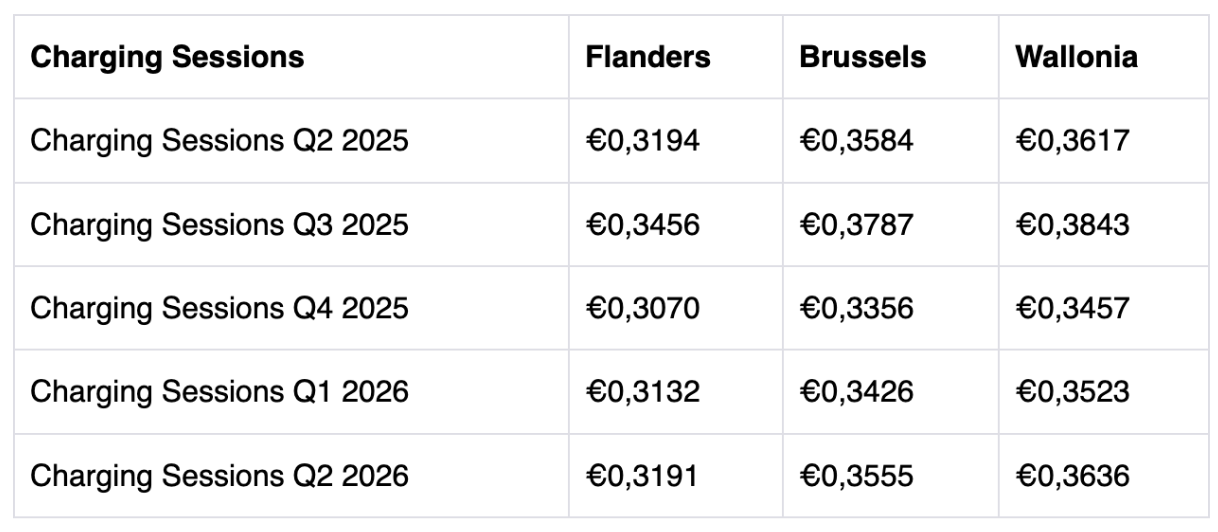
Since 2025, Blink has chosen to follow the regulations of the FPS (Federal Public Service) regarding reimbursements for home charging.

This means that a different rate applies depending on the region, and the employer’s reimbursement is based on the region where the employee resides. These rates are recalculated every quarter.

If the rates differ from this table, it may be that your employer has opted for a fixed amount per calendar year. Please check with your employer for more details if needed.

More information about reimbursements and the related legislation can be found here.

EVA

How do I enter my bank account number?

If entitled to reimbursement, we need your bank account number so that we can reimburse you. So make sure you enter your account number in your EVA account when you create it or log in for the first time. Enter your account number as follows:

  • Go to the ‘Administration’ tab

  • Select ‘Edit User’ in the top left corner.

  • Fill in your account number in the ‘Bank Account IBAN’ field

  • Select ‘update’

  • Voila!

Attention! Please note that we only use your account number for reimbursement of home charging sessions if you are entitled to them, this is not a payment method for (public) charging sessions.

Simple! Just follow these steps:

  1. Go to ‘Charging history’ on the Administration tab.

  2. Optional: Select the card(s) (or chargers) you want to export the sessions from.

  3. Click export and voila! Your export is ready.

Although it may look like your charge point, relative to the charge data in your EV App, has done a wrong registration of your charges, this is not the case. Most Apps that come standard with an EV, round up the charging data to arrive at a round number. Thus, the total registration of your charging data in your EV App is (much) higher than what you see on the detailed overview of the reimbursement, which is based on decimal numbers. Please note that our charging systems are equipped with certified meters that transmit every kWh in decimal numbers to our backend. Therefore, on the detail statement, you will see that the kWh paid out is shown with two decimal places.’

If you’re still doubtfull about the quality of your charging data, please contact us!


If entitled to reimbursement, we need your bank account number so that we can reimburse you. So make sure you enter your account number in your EVA account when you create it or log in for the first time.

How do I enter my bank account number?

Sometimes, your individual charging sessions do not completely reach the EVA platform. A variety of reasons are possible. For example, the charger was temporarily offline or the Smart Cable was de-energised too quickly after a charging session.

I’m counting on being reimbursed… now what?

We do not take individual charging sessions into account in order to better ensure the accuracy of your reimbursement. The total power consumed each month is the basis used for your reimbursement. The internal kWh counter of the charge point measures the total power. This is why charging sessions are not shown on the detailed document you receive each month. It only shows total consumption and the calculation of the amount paid into your account.

Note! So, you may see fewer charging sessions in your portal than were reimbursed. We are working hard to correct this and prevent this in the future.

Do you have the login details for your old MyBlueCorner account?

If yes:

  1. Enter your old username and password

  2. You are then asked to enter an email address (it can be the same email address!), a new password, and to confirm these.

  3. Successful? Welcome to EVA! 🙂

If no:

  1. In most cases, the account username is your charge card number. This tip is also shown on the login screen.

  2. If you entered the charge card number but cannot remember the password for the old account, you can choose to receive a temporary password. This allows you to create a new password for the old account.

  3. Once you create a new password for the old account, you can use this password to transfer your account to the new EVA platform.

We always try to configure your charge point so it is visible in your EVA portal as soon as possible after installation or delivery. However, a delay is possible when we are a bit behind due to lots of deliveries. Don’t worry! This doesn’t affect the recording of your charging sessions registered by default in our back end.* Has your charge point still not appeared in your portal two weeks after installation or delivery? Then please contact our Customer Service. 

* For more information on the visibility of charging sessions, see Why can’t I see my charging sessions in EVA?

Public Charging

How long does it take for my EV to charge?

You can use your Blink charge card at most charge points in Europe. Want to be sure where to go? Look at the ‘Locations’ tab in your EVA portal. You can find out to use this here.

Common charge points that are not yet accessible with your Blink charge card:

  • Tesla chargers

  • Fastned

SMS charging was a service provided in the past that is no longer offered. Unfortunately, not all charge points clearly indicate this yet. We are working on this! Would you like to use our charge points and those of our partners? You can easily apply for a free charge card for these locations here!

A charging cable stuck in the charger may cause some alarm! Don’t worry, you can usually fix this easily. In most cases, a stuck charging cable occurs when the cable is not inserted far enough into the charge point. This stops the lock of the connector* from properly snapping into place. So, it malfunctions and this prevents it from releasing. Always follow these steps first:

  • Push the charging cable into the connector as far as it will go. When you insert the cable further, you should hear a click. This means the charger has properly ‘locked’ the charging cable in place. Only now can the cable be unlocked.

  • Hold your charge card in front of the reader again. You can now end your charging session properly and remove the charging cable.

  • Remove the charging cable from the charger

That did not work? Please contact Customer Service. An employee can remotely release the lock provided the charging cable is fully connected.

* Connector = the charger ‘socket’

PQ 100 Smart Cable

How do I use my PQ 100 Smart Cable?

The Smart Cable is completely dependent on the 2G network. If it does not come online, you will recognise this by the yellow LEDs. Plug the Smart Cable into the socket and wait 5 minutes. Are the LEDs still yellow? You may not have adequate coverage in your neighbourhood to connect to the 2G network. Try plugging in the Smart Cable at a different location, for instance, the office. Does the Smart Cable not come online there either? Contact our Customer service

We advise against the use of an extension cable because most common extension cables are not powerful enough to conduct the necessary current. If you must use an extension cable, make sure the cable has a minimum rating of H05RN-F, but preferably H07RN-F with a thickness of 3 × 2.5 mm².

Installation and inspection

My installation was rejected… what now?

You receive an automatic email with the inspector’s report if they rejected your installation. The report lists the reason for the inspection’s negative findings. You may need to take one or more actions to ensure the installation complies with the legal conditions. You may need to address excessive ground resistance, the main differential not working, or another reason related to your home installation. We will contact you to explain step by step how you must correct the issue. Our inspection partner will schedule a second appointment. In some cases, the Service Partner overlooked something and must come back. In this case, they will contact you for a second appointment. In this case, too, the inspection partner schedules a new appointment with you.

Consumer

If you have not done so yet, create an EVA account and order a charge card! You can then use public charging while waiting for your charge point. In most cases, you will need your charge card to activate your charge point. You can find your charging sessions in EVA.

  1. Our Service Partner will contact you. Blink works with professional service partners who can install your charge point(s). They will contact you for an appointment.

  2. The installation takes place on the agreed date. The technician will arrive at your place as agreed to install the charge point. The technician uses a test device on the charge point to check that it is online and our back end records the charging sessions.

  3. The service partner lets us know that the installation was successful. This generates an order for our partner to inspect the installation. A certified independent party must inspect each change to your electrical installation. They will contact you for an appointment.

  4. Great! Your installation is ready for use. We will configure the charge point as ordered and add it to your account.

  5. (Flanders) Since June 2021, all private chargers with a charging capacity of 5 kVA or more must be notified to Fluvius. This has been determined by the VREG (Flemish Electricity and Gas Market Regulator). Click here to register your charger.

  6. Need something else? Blink is ready to help you!

Happy charging!

(Installation rejected: You receive an automatic email with the inspector’s report if they rejected your installation. The report lists the reason for the inspection’s negative findings. You may need to take one or more actions to ensure the installation complies with the legal conditions. You may need to address excessive ground resistance, the main differential not working, or another reason related to your home installation. We will contact you to explain step by step how you must correct the issue. Our inspection partner will schedule a second appointment. In some cases, the Service Partner overlooked something and must come back. In this case, they will contact you for a second appointment. In this case, too, the inspection partner schedules a new appointment with you.) 


B2B

For larger installations, we determine the best solution by assessing your particular situation and drawing up a customised proposal. Our EV experts work with you to find the best charging solution!


Via a leasing company

You will receive a charge card via your leasing company

  1. During the delivery process, you receive an email invitation to create a password for your EVA account. In EVA, you can monitor your charge point consumption and edit your details.

  2. Make sure you enter your bank account number in EVA. This ensures we can credit reimbursements once your charge point is active.

  3. Our Service Partner will contact you. Blink works with professional service partners who can install your charge point(s). They will contact you for an appointment.

  4. The installation takes place on the agreed date. The technician will arrive at your place as agreed to install the charge point. The technician uses a test device on the charge point to check that it is online and our back end records the charging sessions.

  5. The service partner informs us that the installation was successful. This results in the creation of an order for our partner to inspect the installation. A certified independent party must inspect each change to your electrical installation. They will contact you for an appointment.

  6. Great! Your installation is ready for use. We will configure the charge point as ordered and add it to your account.

  7. Need something else? Blink is ready to help you!

Happy charging!

(Installation rejected: You receive an automatic email with the inspector’s report if they rejected your installation. The report lists the reason for the inspection’s negative findings. You may need to take one or more actions to ensure the installation complies with the legal conditions. You may need to address excessive ground resistance, the main differential not working, or another reason related to your home installation. We will contact you to explain step by step how you must correct the issue. Our inspection partner will schedule a second appointment. In some cases, the Service Partner overlooked something and must come back. In this case, they will contact you for a second appointment. In this case, too, the inspection partner schedules a new appointment with you.)